Adelphos will address the entire construction design process through different software packages. Built by industry professionals who have experienced the gap in the market.
Download release date to be announced. Video coming soon.
Apps
Eleven apps are in development, with free engineering calculators available now on the same Adelphos platform.
See all apps →
Revit Copilot
Revit add-inIn Development
Adelphos Chat
Web · DesktopIn Development
Specbuilder
Web · WordIn Development
Report Builder
Web appIn Development
Document Controller
Desktop · WebIn Development
QA Manager
Desktop · RevitIn Development
Schedule Builder
Revit · WebIn Development
COBie Manager
Revit · WebIn Development
AutoCAD Copilot
AutoCADIn Development
Adelphos for Word
Word add-inIn Development
Adelphos for Excel
Excel add-inIn Development
Calculators
Free web toolsLiveAdelphos is preparing for release. Notify me on release.
See the full roadmap →Client Briefs. Site Survey Reports. Tender Specifications. Schematics. RIBA Stage Reports. QA Reports. Document Issue Sheets. Emails. COBie Data. Free Templates. Free Families. Revit Copilot. AutoCAD Copilot. Excel Plugin. Word Plugin. AI Agents. Built for AEC.
Revit Copilot
An AI engineer that lives inside Revit and runs the model with you. 532 commands. 395 tools. One chat.
Open Revit Copilot →Included in Revit CoPilot, an array of commands for design and modelling.
Clash Solver
Reports clashes. Resolves them — with your permission. Logs every decision.
Connect Clash Solver to your ACC project. It pulls the latest clash report, deduplicates against the previous run, and triages: real clash vs ghost (model-link drift, family swap, view-filter mismatch). For each real clash it proposes a resolution — re-route the smaller service, raise the ceiling void in the affected zone, swap a fitting, etc. — and shows you what the model would look like after.
You accept, refine, or reject each proposal. Set it to auto-resolve when the agent is confident enough, or keep full manual control. Every resolution is applied as an auditable Revit transaction. Every change records who made it, which agent proposed it, what was changed, and why — the full audit trail.
COBie Manager
A live COBie deliverable, never a panic before hand-over.
COBie Manager is the COBie tool every BIM coordinator wishes Revit shipped with. Populates 20+ COBie sheets from the live model, validates against BS 1192-4 and your project EIR, and tracks every change with an audit log.
Every cell traces back to the source Revit element. No manual mapping, no copy-paste from schedules — the agent reads the model, fills the workbook, flags what's missing, and hands you a file ready for the client.
COBie at a glance
Reports and specifications
Reports generated from your model, your IESVE, your calcs — not a template.
Report Builder reads the live Revit model, your IESVE simulation outputs, calculation results, meeting minutes and site photography — and assembles a production-ready report. AI editing capabilities let you refine IESVE outputs directly inside the report workflow. Every claim traces to its source data.
Twenty-eight mapped Report Studio templates cover site surveys, MEP design reports, option appraisals, energy and overheating studies, BREEAM evidence, load assessments and coordination reports. Point a report type at a project and the agent assembles the controlled evidence for review.
Open Report Builder → Browse report templates →Specifications
from brief to first draft — fully editable, ready for sign-off
deterministic output — same inputs always produce the same specification
NBS, CIBSE, ASHRAE or your own house template — your standards, your format
A deterministic MEP specification — derived from the brief, the drawings and the decisions.
Specbuilder doesn't guess. It reads the client brief, cross-references the live Revit model and your drawings, layers in site information and design discussions, and writes a stage-appropriate MEP specification. Every clause is traceable to a decision, a calculation or a drawing — not an LLM's best guess.
Lock sections you've hand-edited, regenerate only what's changed downstream. NBS, CIBSE, ASHRAE or your own house template. The whole system is holistic — brief to model to specification to report, all connected through the same project data.
Schedules
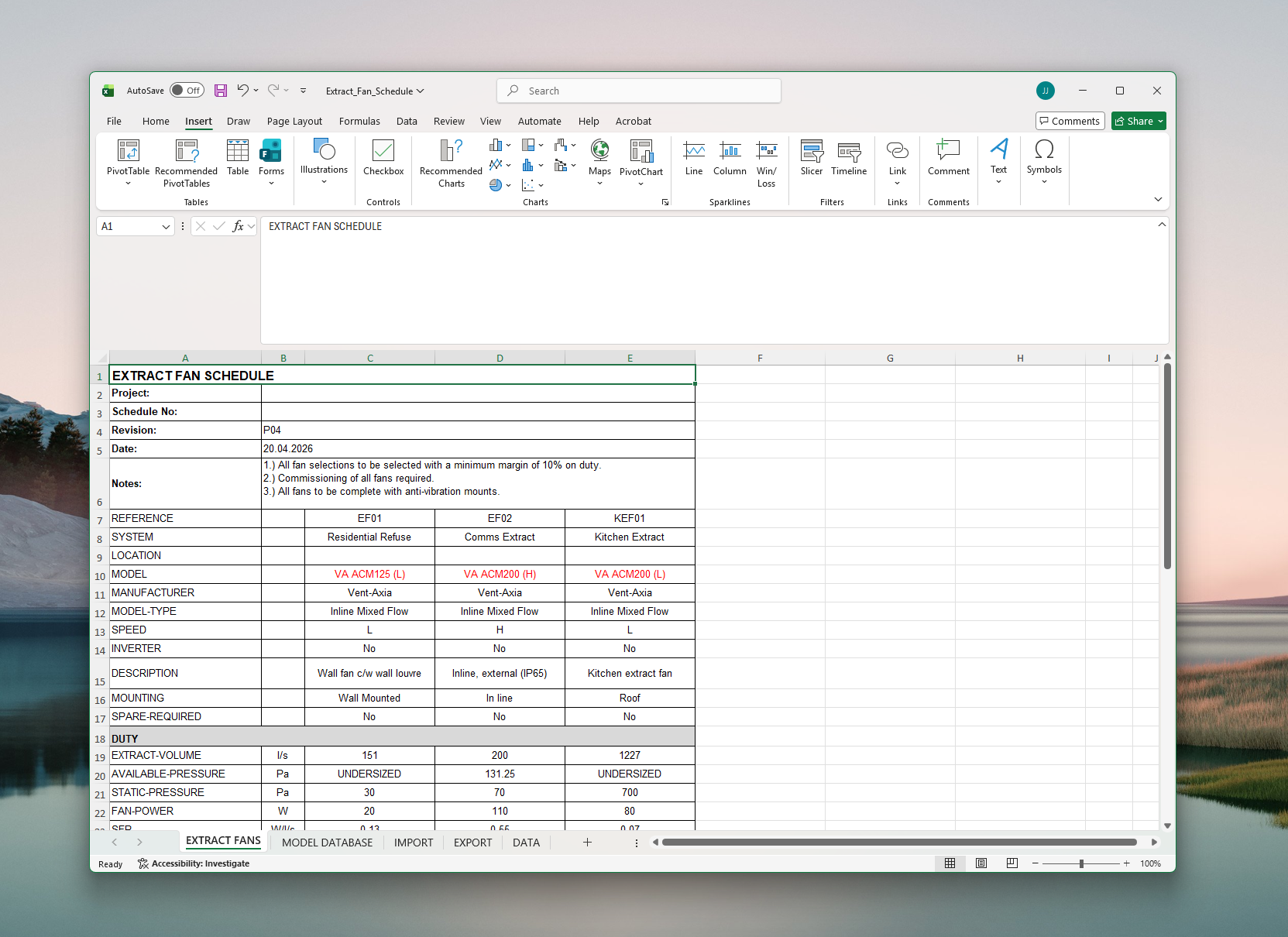
Schedules extracted from the live model. With manufacturer's technical data inside. Sized and selected.
Schedule Builder reads the live Revit model and produces door schedules, window schedules, room schedules, equipment schedules — every row traced to a model element. Change a door in the model and the schedule updates. No manual reconciliation, no copy-paste from exported views.
Export to Excel with a single click. The data is the model data: element IDs, parameter values, type marks, dimensions, fire ratings — pulled live, formatted to your template. The schedule is always the model, never a stale copy of it.
Open Schedule Builder →Document Controller
Transmittals, registers, revision tracking — the agent runs your document control.
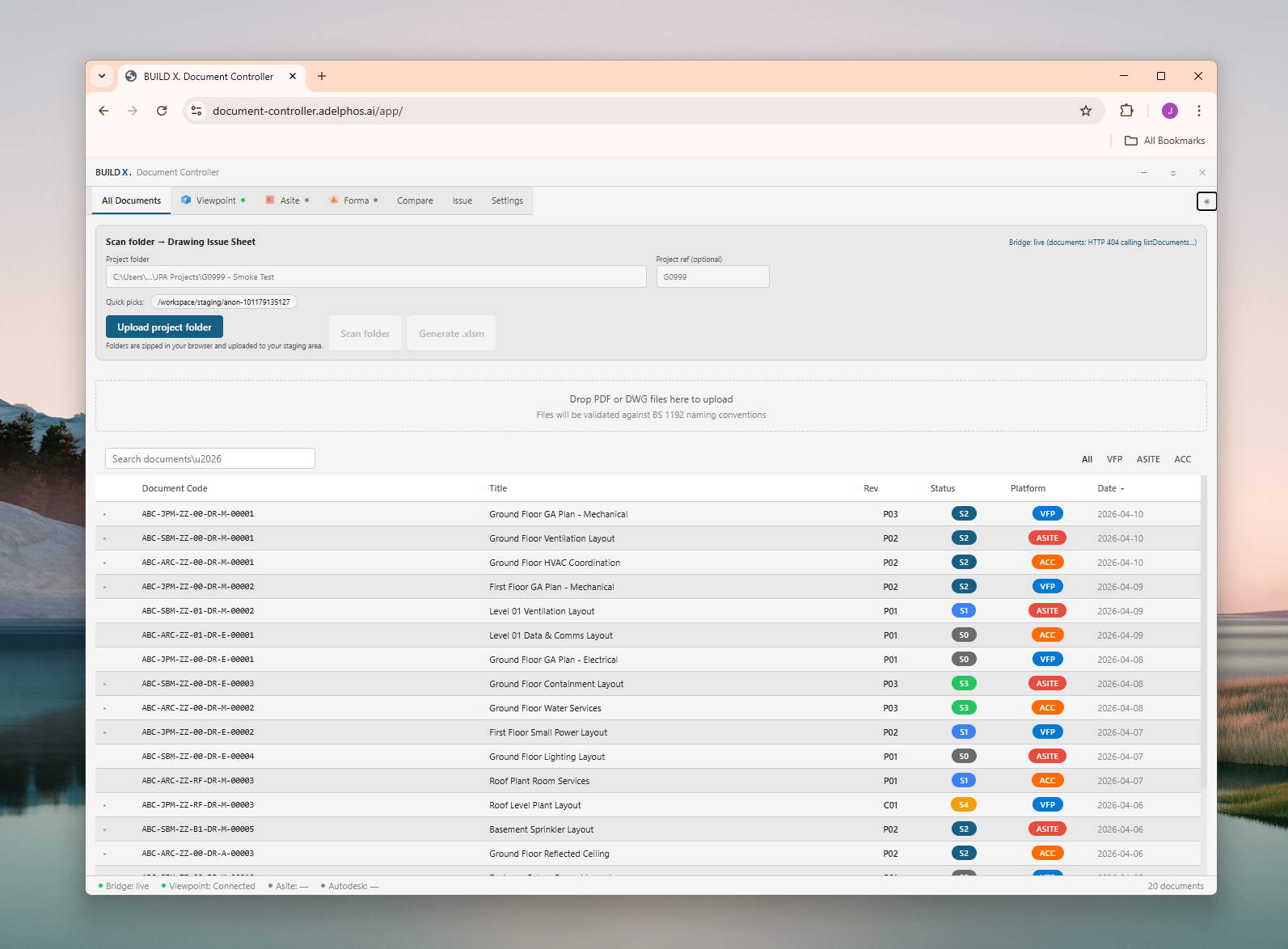
Document Controller processes incoming transmittals from email or SharePoint, logs every document to the register automatically, tracks revisions with full approval status, and chases approvals on a configurable schedule. BS 1192 naming convention validation on every entry.
One register across every platform — Viewpoint, Asite, Forma, ACC.
Colour-coded status badges from S2 through S6, revision history on every row, and configurable reminder workflows that actually chase people. Compares every revision against the previous and flags what changed.
deterministically matches drawing numbers
for an updated drawing issue sheet
from Teams, email or phone




Agentic services
Managed services where Adelphos runs the agent against your business — finances, project management, document control. Plus four email services for one-off work.
AI Finances
Automated bookkeeping, invoicing and cash-flow forecasting — driven by your live project data.
AI Project Management
Programme tracking, risk registers and reporting — the agent keeps the project on rails.
AI Document Controller
Transmittals, registers, revision tracking — the agent runs your document control.
Just email the address. We handle it.
Four dedicated email addresses — one per service. Send the brief or the model, receive the deliverable. No data stored for training, no information retained. A repeatable template process, dedicated to your project.
Engineering calculators
Browse 18 free calculator pages and the 48 live calculator entries in the Adelphos app. Public and app entries overlap where the same calculation is offered in both places.
Integrates with
The agent reads from and writes to the tools you already use. The platform plugs into your existing Revit, AutoCAD, Excel, Word and IESVE files — no migration required.



Get release notifications.
Request a release notification and we will tell you when the download is available. Agentic services are live — talk to us for a quote.